
With Online Banking you can:
- View account balances, detailed transaction history, loan payment history, cleared checks and more.
- Transfer funds between your eligible account types or authorized joint accounts.*
- Transfer funds to other Eglin FCU member accounts or loans. (You’ll need the member’s account number, account suffix and the first two letters of their last name.)
- Make payments to your Eglin FCU loan or Credit Card using funds from another financial institution. (Mortgage loan payments are excluded.) Requires initial setup.
- Enroll in free eStatements for faster, more convenient access to your account documents.
- Sign up for Bill Payer, available at no cost when you complete at least three transactions per month.
- Sign up for Credit Score by SavvyMoney for free, unlimited access to your credit score, credit report and much more.
- Set up Activity Alerts to stay informed about your account activity.
- Order checks for a qualified Checking Account.**
- Update your contact information quickly and conveniently.
- Send secure messages to Eglin FCU with questions or comments.
*You can access joint accounts with a Cross Account Authorization. To learn more, please contact us during business hours at 850.862.0111, Option 4, or visit us at any branch. You may also send us a secure email anytime.
**Initial check order must be placed in branch or by calling us at 850.862.0111, Option 4, during business hours. Future check orders may be placed through Online Banking.
Online Banking Requirements
To enroll in Online Banking, you must be an Eglin FCU member with internet access, a supported web browser and a valid email address. Keeping your email address up to date ensures you receive important account notifications and security alerts. Eglin FCU will not share your email address without your consent.
For your protection, Online Banking access will be locked after 15 months of inactivity. If your account becomes locked, simply select Login on our website and use the Reset Password or Locked Out? Click Here options to regain access.

Eglin FCU Mobile App
Take your Credit Union with you wherever you go. The Eglin FCU Mobile App gives you secure, 24/7 access to your accounts from your mobile device, making it easy to bank when and where it's most convenient for you.
Download Now Download Now
Bill Payer
Schedule as many one-time or recurring payments as you like up to a year in advance. This service may also be used to transfer Eglin FCU funds to your accounts at other financial institutions. Log into Online Banking or the Mobile App to set up your Bill Payer account today.
You must have an active Eglin FCU Checking Account to use this service. Bill Payer is free with a minimum of three completed transactions per calendar month. If you complete less than three transactions each month, a $5 fee will be assessed.

eStatements
eStatements provide a fast, convenient, secure and paperless alternative to mailed statements, available whenever you need them through Online Banking or the Mobile App.
Learn more about eStatements >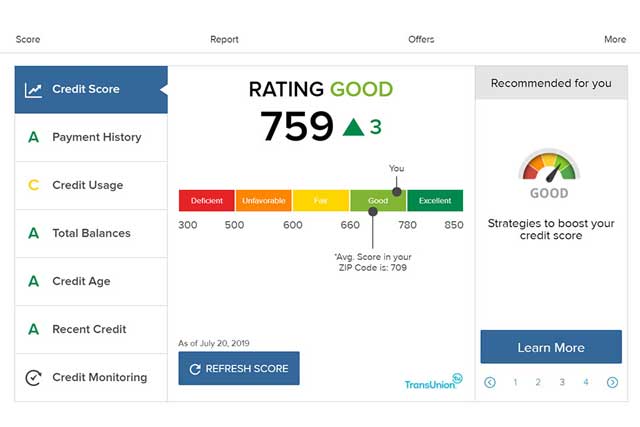
Your Credit Score and More
Gain valuable insight into your credit health with free, unlimited access to your credit score, credit report, monitoring tools and personalized recommendations, all without affecting your credit score.
Learn more about this feature >
Activity Alerts
Stay informed about important account activity with Activity Alerts. Easy to set up and customize, Activity Alerts provide added security, greater account awareness and peace of mind.
More about activity alerts >Frequently Asked Questions
How do I recover my username?
If you have forgotten your username for Online Banking and the Mobile App, please click "login" in the top-right corner of our website and select "forgot username." You will then be asked to enter your account number, birth date and the email address you have on our system. After submitting this information, you will receive an email with your username. If you do not receive the email with your username, please check your junk/spam email folder.How do I reset my password?
To reset your Online Banking and Mobile App password, please click "login" in the top-right corner of our website and select "forgot password." You will then be asked to enter your username, birth date and the email address you have on our system. After submitting this information, you will receive an email with a link to reset your password. If you do not receive the email with the link to reset your password, please check your junk/spam email folder.I am locked out of Online Banking and Mobile App. How do I unlock the service?
If you are locked out of Online Banking and the Mobile App, please click "login" in the top-right corner of our website and select "forgot password" to unlock your account. You will then be asked to enter your username, birth date and the email address you have on our system. After submitting this information, you will receive an email with a link to reset your password. If you do not receive the email with the link to reset your password, please check your junk/spam email folder.How do I log in to Online Banking or the Mobile App?
Access to Online Banking and the Eglin FCU Mobile App must first be established in order to log in and access your account. Apply for Online Banking access by selecting "Online Banking" on our Applications & Forms page. If you are still having trouble logging in, or need further assistance, please contact us via secure email, phone or visit a branch.Can I view transactions for a specific date range?
Up to 24 months of transaction history, including loan payments and deposit history, can be viewed within Online Banking and the Mobile App.Is the Mobile App secure?
The Eglin FCU Mobile App uses TLS 1.2 protocol to communicate securely throughout the entire process of accessing your accounts.What will happen if I forget to logout?
Your login session for both the Mobile App and Online Banking is active for 20 minutes. Activity during the session does not extend this time limit. While we advise you to log out or close the app once you have finished your tasks, the system will automatically log you out after the 20-minute mark for your security.What browsers does your Online Banking platform support?
Our Online Banking platform is supported by most modern browsers such as Chrome, Edge, Firefox and Safari. We recommend keeping your operating system, firewall software, antivirus software, antimalware software and browser updated to the latest version for the safety of your personal information and to ensure you do not have any interruption of service.How do I transfer funds to another member?
To transfer funds to another member using Online Banking or the Mobile App you will need to know their account number, the first two initials of their last name, and the account suffix they wish to have the funds deposited into. Please note: When performing a member to member transfer, the abbreviation for the account suffix must be entered, for instance Regular Share Savings is "S1" and Premium Checking is "S9."You can view your account balance on the landing page of our Online Banking or Mobile App. If you do not have access to these, you can visit a local branch or call us during business hours to retrieve your balance.
We currently do not offer the ability to rearrange the order of how your account suffixes are displayed in Online Banking or the Mobile App; however, you can hide suffixes under Settings.
You can view your account history within Online Banking and the Mobile App. 24 months of transaction history is available through Online Banking and the Mobile App.
You can view your loan history within Online Banking and the Mobile App. 24 months of loan payment history is available through Online Banking and the Mobile App.
To deposit funds into another member's account using Online Banking or the Mobile App you will need to know their account number, the first two initials of their last name, and the suffix they wish to have the funds deposited into. Please note: When performing a member to member transfer, the abbreviation for the suffix must be entered, for instance Regular Share Savings is "S1" and Premium Checking is "S9".
You can view your account summaries, cleared checks, loan payment history and detailed transaction history inside of Online Banking and the Mobile App.
You can transfer funds to your other account suffixes, joint accounts* or other Eglin FCU member accounts or loans (if you have their account number and suffix) inside of Online Banking and the Mobile App.
You can transfer funds from your external accounts to make your Eglin FCU Mastercard payment or pay your Eglin FCU loan (excludes Eglin FCU mortgage payments) using the External Transfers feature inside of Online Banking and the Mobile App. Please note: Initial setup takes several days.
You can sign up to access your free credit score and report and receive offers based on your current credit and credit products inside of Online Banking and the Mobile App.
You can sign up for Bill Payer, free with three completed transactions per month inside of Online Banking and the Mobile App.
You can sign up for eStatements, set up email alerts and order checks inside of Online Banking and the Mobile App.
You can update your contact information, username and password inside of Online Banking and the Mobile App.
You can Send Secure Messages to Eglin FCU with questions or comments inside of Online Banking and the Mobile App.
You can monitor your credit card activity within Online Banking or the Mobile App.
You cannot use the External Transfers service to deposit funds into another member's account. External Transfers can only be set up and used to make payments from your other financial institution to your Eglin FCU loan or credit card.
You cannot use the External Transfers service to deposit funds into a chekcing or savings account. External Transfers can only be set up and used to make payments from your other financial institution to your Eglin FCU loan or credit card.
Video tutorials for the mobile app, many of which also apply to Online Banking, can be found at https://www.eglinfcu.org/mobileapp/.
If you have forgotten your username for Online Banking and the Eglin FCU Mobile App, please click "login" in the top-right corner of our website and select "forgot username." You will then be asked to enter your account number, birth date and the email address you have on our system. After submitting this information, you will receive an email with your username. If you do not receive the email with your username, please check your junk/spam email folder.
To reset your Online Banking and Mobile App password, please click "login" in the top-right corner of our website and select "forgot password." You will then be asked to enter your username, birth date and the email address you have on our system. After submitting this information, you will receive an email with a link to reset your password. If you do not receive the email with the link to reset your password, please check your junk/spam email folder.
If you are locked out of Online Banking and the Mobile App, please click "login" in the top-right corner of our website and select "forgot password" to unlock your account. You will then be asked to enter your username, birth date and the email address you have on our system. After submitting this information, you will receive an email with a link to reset your password. If you do not receive the email with the link to reset your password, please check your junk/spam email folder.
Up to 24 months of loan payment history can be viewed in the Mobile App and Online Banking. Up to 24 months of transaction history can be viewed in the Mobile App and Online Banking. Up to 24 months of deposit history can be viewed in the Mobile App and Online Banking. Up to 24 months of withdrawal history can be viewed in the Mobile App and Online Banking.
Can I view transactions for a specific date range? Up to 24 months of transaction history, including loan payments and deposit history, can be viewed within Online Banking and the Mobile App.
If your Online Banking or Mobile App access has been disabled (as opposed to locked), please contact us by calling 850.862.0111, using our secure email, or visiting a branch during normal business hours so we can assist you with re-enabling your access.